An AI agent returned an answer. HTTP 200, no errors, every dependency is up. Time to breathe out?
That depends on what it returned. Maybe the answer is useful. Or maybe the agent did not find the data it needed, confidently filled in the gaps and spent more money doing it than yesterday. On an availability chart these two cases look exactly the same.
In a previous post I wrote about Observability as Code: traces, logs, metrics and alerts in Git, and the path from an alert to a root cause. This time I want to talk about observing the AI itself: how to understand what an agent does between the request and the word “done”.
What follows is a generalized process built on OpenTelemetry, the GenAI semantic conventions and Elastic APM. The scenarios, service names, code and numbers in the examples are illustrative. It covers how to collect the execution context, find the cause of a delay, work out the cost, and connect all of it to the quality of the result.
What exactly we want to know
An agent is still a service. It has latency, timeouts, errors and dependencies. But on top of the usual “is it working” come questions about behavior and outcome:
- What did it do? What data it received, how many times it called the model, which tools it called and why it stopped.
- What did it cost? Tokens, cache usage, external calls and the cost of a single task.
- Did it do the job? Does the result match the request, is it grounded in sources, did it pass the checks.
- What happened to the result? Did the user accept it, fix it, reject it, or ask for the whole thing to be done again.
Imagine an agent that has to find information in a knowledge base and prepare an answer. The search came back empty, but the model wrote something anyway. Technically the operation completed. From the product side there are more questions than answers.
Or the agent did everything right, but one external call held the result up for half a minute. Or it finished the task only after several retries. Or it lost the task before it ever called the model.
That is why HTTP status codes alone are not enough. You need to see the path of the task and to have criteria by which a result can be called useful.
Because an agent that is fast, cheap and needed by nobody is a very well optimized zero.
Start with a single task
First, define the boundaries of the operation: when the system accepted the task and when the result became available to the consumer. Along that path there can be waiting in a queue, gathering context, starting the agent, model calls, tools at work, checking the answer and delivering it.
If you only start measuring at the first model call, the queue and the data preparation disappear from the picture. If you stop measuring right after generation, you may miss that nobody ever received the finished answer.
For a connected execution it is convenient to see these stages in one trace. Every significant operation gets its own span with a duration, a status and attributes. In asynchronous or long-running processes, separate traces can be tied together with span links and a task ID: keeping one span open for hours is not always a good idea.
A simple discipline helps here:
- propagate trace context across HTTP, RPC and queue boundaries;
- tell a model call apart from a tool execution;
- record why it finished: success, timeout, cancellation or an exhausted budget;
- tie errors and logs to the execution they belong to;
- store the versions of the application, the prompt and the agent configuration, so you can compare behavior after changes.
Then “the agent took a long time” turns into a concrete observation: most of the time it was waiting on search, retrying a failed call or processing an oversized context.
The service and the agent in one trace
One of the most practical benefits of OpenTelemetry is that you can tie the calls of your service and of the agent into a single story. If you propagate trace context between components and export their spans to a shared backend, one waterfall shows the incoming HTTP request, the database calls, the agent starting, the model calls and the tools at work. Even if the service and the agent are written in different languages and run in different environments.
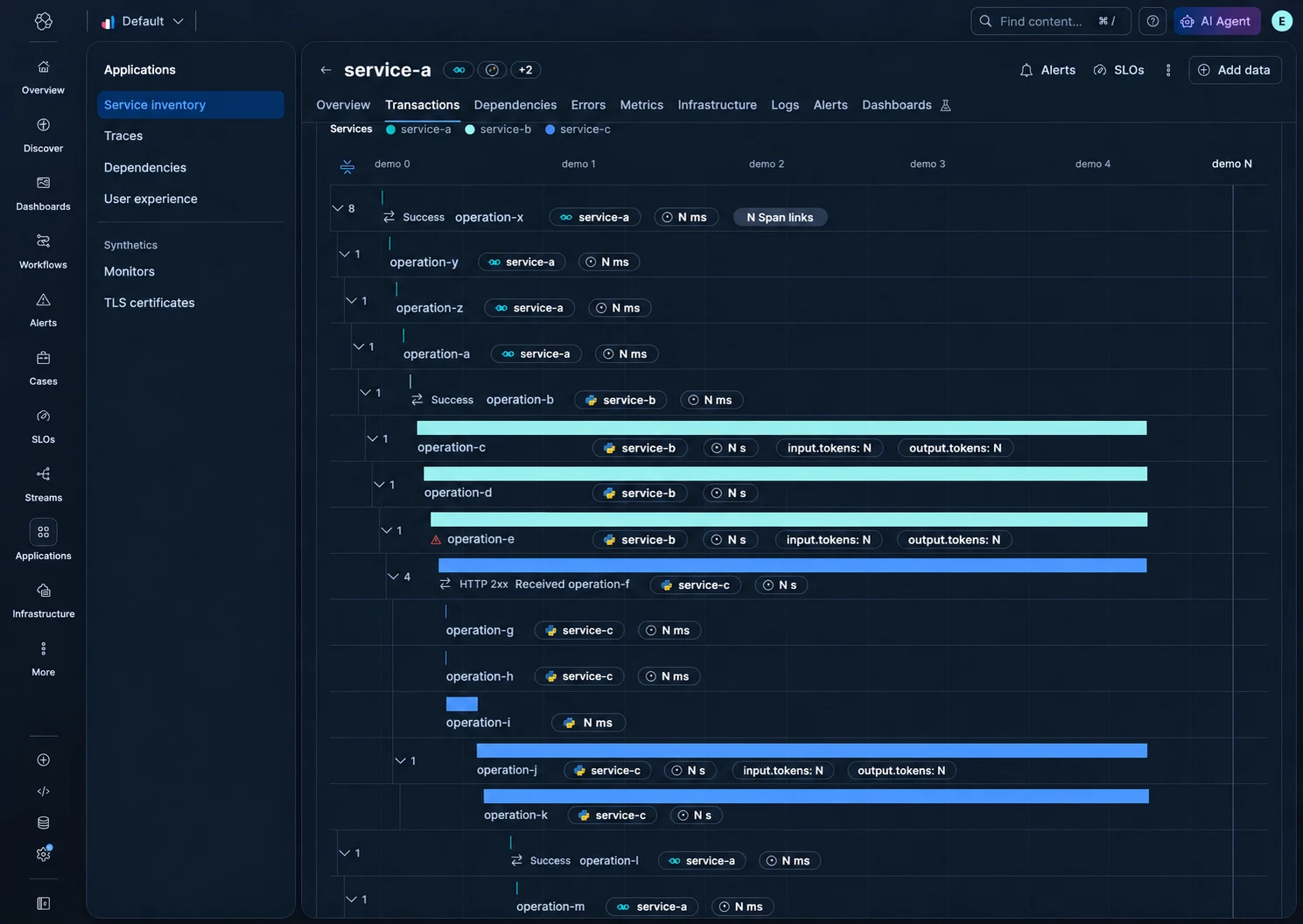
For delivery you can use the same OpenTelemetry Collector we already met in the previous post. The service and the agent send telemetry over OTLP to a shared Collector, and it passes it on to Elastic through the configured pipelines. The familiar mechanisms stay in place: batching, filtering, attribute enrichment and masking of sensitive data, according to how the processors are configured. The new agent becomes one more telemetry source in a system the team already knows how to configure and run.
The practical takeaway: if you already have OpenTelemetry and your observability vendor supports the GenAI conventions you need, you do not have to add a new platform to your perimeter to observe an agent this way. You can use the Collector, the storage and the UI you already have. What remains is to wire up the agent’s instrumentation, propagate trace context, and check that the attributes you need make it through the pipeline and show up in the backend. There is extra work, but a separate system just for AI telemetry is not required.
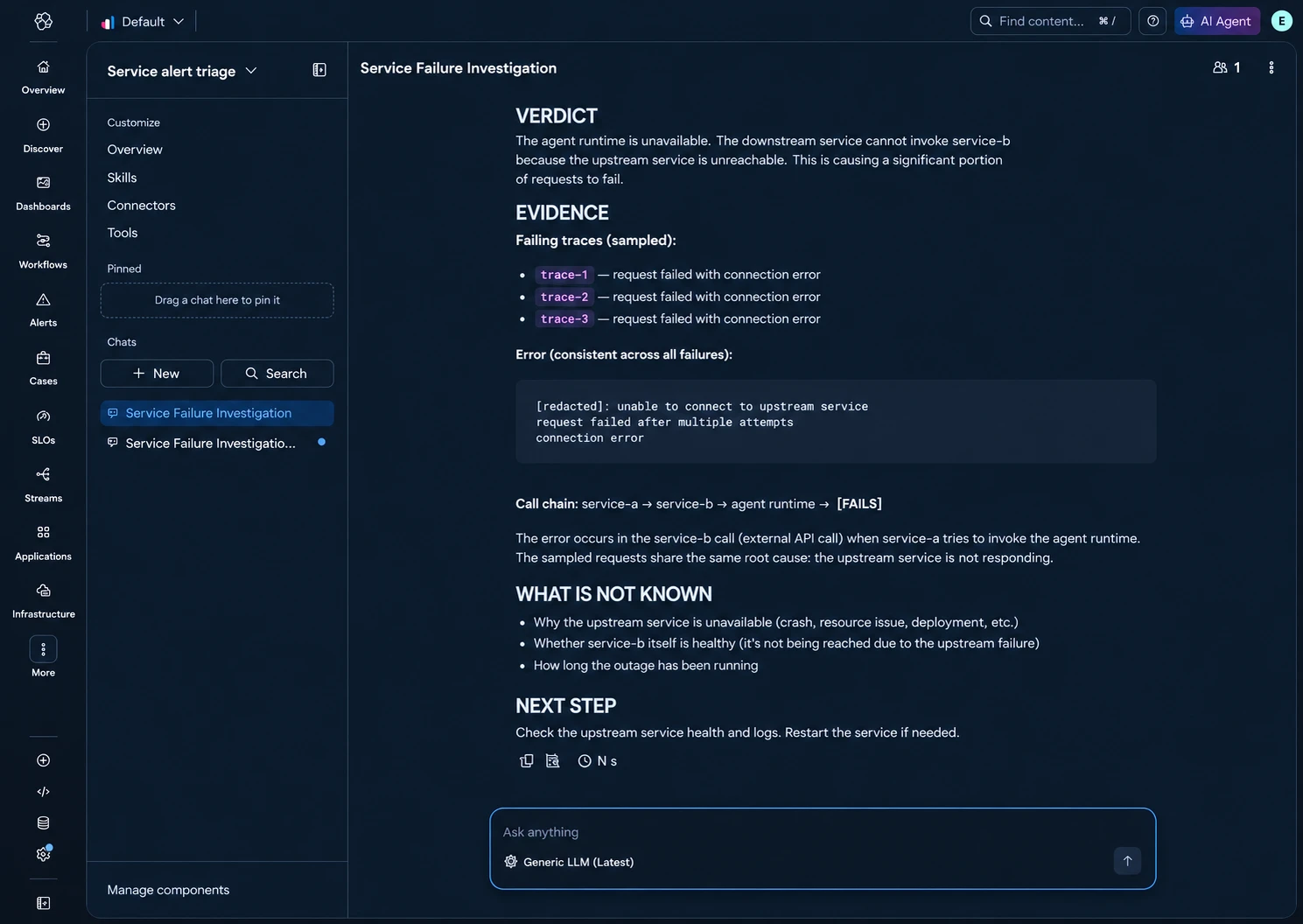
To debug such a request you do not have to find it in APM first, then jump to a separate system like MLflow or Phoenix and match timestamps and IDs by hand. The whole instrumented execution can be examined in the same Elastic APM where the rest of the application is already visible. This is especially useful when the problem sits on a boundary: the service took a long time preparing the context, the agent waited on an API, or the answer got lost after it was generated.
MLflow and Phoenix can be useful for experiments, evals and specialized AI analysis, and both support OpenTelemetry. Shared instrumentation lets you choose where to send telemetry and keep the end-to-end picture in your main observability system.
A vocabulary that is already written
The first temptation is to name everything your own way: llm_tokens_total, ai_cost, agent_duration_v2_final. A week later _final2 shows up.
OpenTelemetry already has GenAI semantic conventions: shared names and rules for telemetry from models, agents and tools. The idea is similar to ECS for logs: we agree on what the fields mean, so every new agent does not bring a vocabulary of its own.
Here are some of the attributes you can start with:
| What we describe | Attributes |
|---|---|
| The operation | gen_ai.operation.name: for example, chat, invoke_agent, execute_tool |
| Provider and model | gen_ai.provider.name, gen_ai.request.model |
| How a model call ended | gen_ai.response.finish_reasons, error.type for errors |
| Token usage | gen_ai.usage.input_tokens, gen_ai.usage.output_tokens |
| Cache | gen_ai.usage.cache_read.input_tokens, gen_ai.usage.cache_write.input_tokens |
| Agent and tool | gen_ai.agent.name, gen_ai.tool.name, gen_ai.tool.call.id |
| Conversation or session | gen_ai.conversation.id |
For content there are gen_ai.system_instructions, gen_ai.input.messages and gen_ai.output.messages, and for tools gen_ai.tool.call.arguments and gen_ai.tool.call.result. For metrics there are, among others, gen_ai.client.operation.duration and gen_ai.client.token.usage.
The conventions have Development status, so it is important to pin the instrumentation versions and the supported formats. An SDK may lag behind the current conventions or need a separate switch to turn them on.
Different frameworks and client SDKs can be plugged into this process. How you instrument depends on what the agent is built with:
| Tool | How to wire up telemetry |
|---|---|
| Strands | Has its own OTel instrumentation. You need to configure the export and check which flavor of the conventions and which content format your chosen version uses. |
| LangChain / LangGraph | You can plug in OTel instrumentation, for example through OpenLLMetry / Traceloop. This is the approach used in the official OpenTelemetry Demo: spans for the agent’s steps, model calls and tools are sent to the Collector. |
| Google ADK - adk.dev | Has built-in tracing with GenAI attributes and OTLP export. You can point the traces at your existing Collector; the exact settings depend on the language and the SDK version. |
Claude SDK for Go - anthropics/anthropic-sdk-go | This is a client for the model API. You can wrap the calls in your own GenAI spans or plug in a separate OTel middleware from OpenInference. That integration uses OpenInference attributes, so a backend that expects gen_ai.* specifically may need them normalized. |
It is important to tell OpenTelemetry support apart from a specific set of semantic conventions. A shared transport lets you deliver spans to the same Collector, and correct attributes help the backend recognize the model, the tokens and the messages. The execution of your own tools and the boundaries of the product task are also worth checking separately: the model client does not necessarily see those parts of the process.
The gen_ai.conversation.id attribute alone is not enough to build a span tree. It helps correlate the data of a conversation; the parent-child links between operations come from trace context.
Add instrumentation at the boundaries
The SDK may create some of the spans, but it is your application that knows the boundaries of the product task. That is where it makes sense to add your own instrumentation.
For example, an illustrative Go client for a remote agent can be wrapped like this:
ctx, span := tracer.Start(ctx, "invoke_agent task-agent",
    trace.WithSpanKind(trace.SpanKindClient),
    trace.WithAttributes(
        attribute.String("gen_ai.operation.name", "invoke_agent"),
        attribute.String("gen_ai.provider.name", providerName),
        attribute.String("gen_ai.agent.name", "task-agent"),
    ))
defer span.End()

result, err := client.Invoke(ctx, request)
if err != nil {
    span.RecordError(err)
    span.SetStatus(codes.Error, "agent invocation failed")
    span.SetAttributes(attribute.String("error.type", "agent_invocation_failed"))
} else {
    // In this example the adapter has already normalized usage.
    span.SetAttributes(
        attribute.Int("gen_ai.usage.input_tokens", result.Usage.TotalInput),
        attribute.Int("gen_ai.usage.output_tokens", result.Usage.TotalOutput),
    )
}
This is an instrumentation fragment: providerName comes from the client configuration, and the request and response types depend on the application. Propagating the context into the transport has to be configured too. The ctx argument by itself does not mean the required headers will end up in the request automatically.
Usage normalization deserves a separate check. By the convention, total input includes cached tokens. The provider’s API may return them in separate buckets - the Claude Messages API does that, for example. If the SDK has already calculated the total, do not add the cache a second time.
For cost estimates you still need the buckets separately: regular input, cache reads, cache writes and output can all have different prices. And one more trap: if usage is present both on the child model calls and as a total on the parent span, you cannot simply sum all the spans in the trace.
“The agent is slow” - open the trace
Take a purely illustrative one-minute run. All the stages in this example are sequential:
| Stage | Time |
|---|---|
| Fetch the task context | 6 s |
| First model call | 5 s |
Run search_knowledge | 34 s |
| Second model call | 13 s |
| Check and deliver the result | 2 s |
| Total | 60 s |
The model took 18 seconds. The search took the longest. Swapping the model for a faster one might help a little, but the main delay would stay where it was.
The next question is what exactly happened inside the tool. Was it waiting on an external API? Retrying the request? Setting up a connection? Returning an oversized result? The tool’s span localizes the delay, and nested spans and logs help find its cause.
With parallel calls you can no longer simply sum such a table: their intervals overlap. Then you look at the waterfall and work out which operations actually delayed the completion of the task.
In Elastic APM a trace can be complemented by a query over the collected spans. An example for a service with the illustrative name agent-service and the APM Server data schema:
FROM traces-apm*
| WHERE @timestamp >= NOW() - 1 day
    AND service.name == "agent-service"
    AND processor.event == "span"
| STATS n = COUNT(*), p50_s = PERCENTILE(span.duration.us, 50) / 1000000.0 BY span.name
| SORT n DESC
If traces are sampled, n is the number of stored spans, and the percentiles can depend on the sampling policy too. For the total number of tasks you need metrics that are collected independently of which traces are kept.
Content helps, but collect it deliberately
When debugging quality you often want to see exactly what the model received and what it returned. Otherwise you end up reconstructing the answer from “the user says something weird happened”.
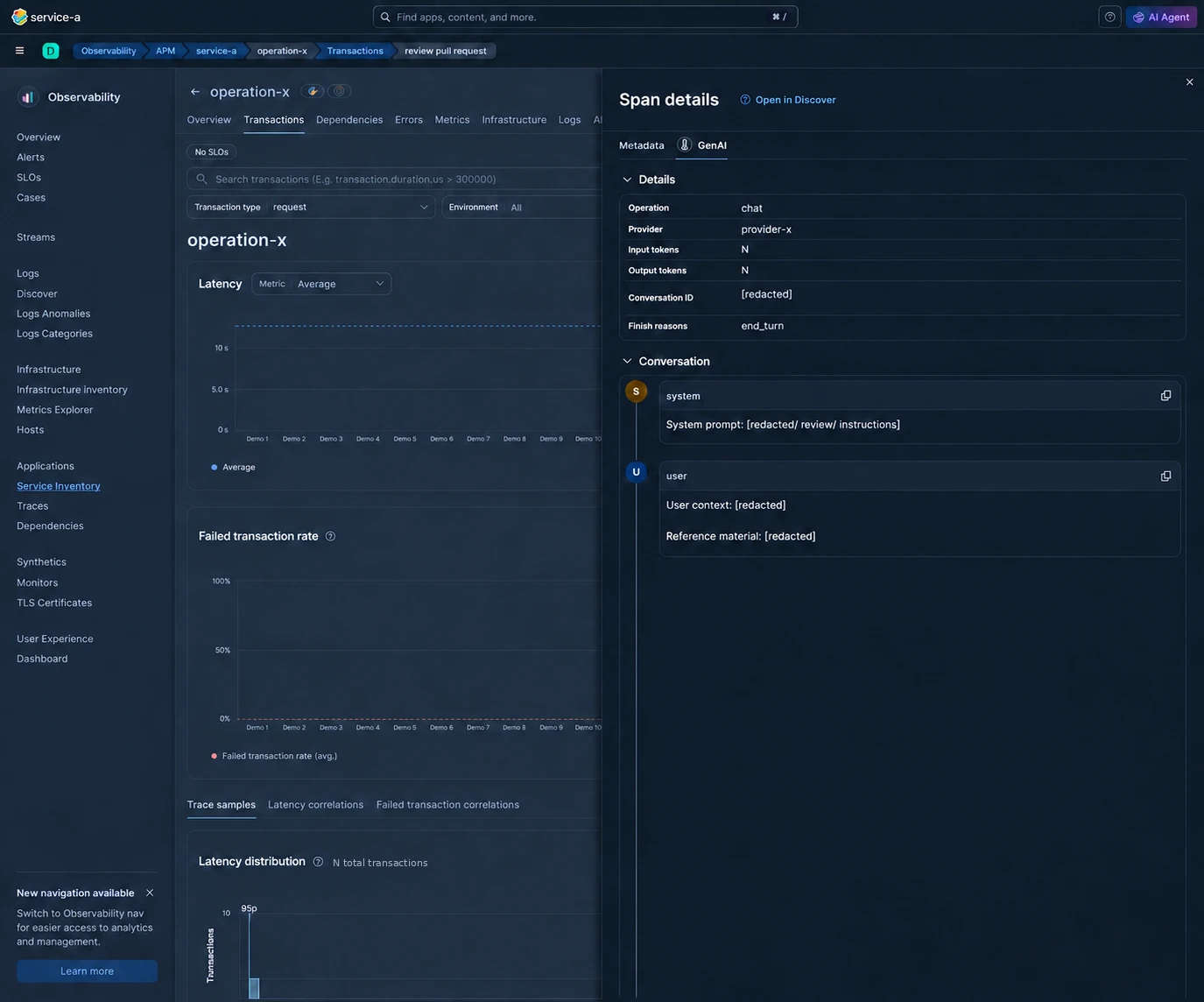
In the GenAI conventions, recording this content is marked as opt-in. The behavior of a specific SDK needs checking: having OTel instrumentation does not by itself guarantee that prompts are off by default.
You can start with metadata: versions, sizes, tokens, statuses and finish reasons. If you need the content, decide which fields may be stored, what gets masked, who will have access and when the data will be deleted. A size limit should preserve the JSON structure, so that a truncated result is still usable for analysis.
How it is stored and rendered depends on the backend and the ingest pipeline. Elastic describes a GenAI tab with messages and token counters: as of 10 October 2026 these features are available as a technical preview in Serverless and announced for Elastic Stack 9.6. Older instrumentation or a different attribute format may give you only raw fields in Metadata or Discover.
So the check has to end in the interface the engineer will actually use. “The exporter sent it” is only one of the steps.
The dashboard: from availability to usefulness
For a first dashboard I would put together six groups of indicators.
- Coverage. How many tasks were accepted, started, completed and delivered to the consumer. What stayed in the queue, was cancelled or got lost between stages. Looking only at successful runs is very convenient - and very misleading.
- Speed. Time from accepting the task to an available result, and separately the waiting, the model’s work and the tools’ work. Plus the number of retries and of runs that hit the iteration limit.
- Quality and usefulness. Check results, user reactions, repeated requests, corrections to the answer. An accepted answer is a useful signal, but the user may also have missed a mistake.
- Cost. The estimated spend per run and per task that met the defined success criterion. A cheap run is not much to celebrate if you have to repeat it three times. It is also worth stating clearly what the estimate includes: just the model, or tools and infrastructure too.
- Agent behavior. The number of model calls, tool calls, cache usage, truncated results, stop reasons. This helps explain where a change in speed or cost came from.
- Reliability. Dependency errors and timeouts, result delivery failures, budget overruns. A successfully generated answer still has to reach its recipient.
Product counters are best updated on transitions between task states. The agent’s internal metrics can be collected by its SDK or handed over to the application - what matters is not counting the same call twice and not losing failed runs.
Labels need discipline too. The task type and the registered tool name have a controlled number of values. Free text from the model or a unique request ID will quickly blow up the number of time series. The details of a specific run are better left in traces and logs.
Briefly about evals
Evals are quality checks against defined criteria. Did the agent answer the question? Are its claims backed by sources? Did it call the right tool? Some checks are done by code, some by a human or an evaluator model, LLM-as-a-judge. A set of such cases helps compare changes to the prompt, the model or the tools.
The GenAI conventions have a gen_ai.evaluation.result event. It describes the name of the check (gen_ai.evaluation.name), a numeric score (gen_ai.evaluation.score.value) and/or a label such as pass or fail (gen_ai.evaluation.score.label), plus an explanation (gen_ai.evaluation.explanation). The cases themselves, the criteria and the evaluator come from your code or an eval framework.
The event should be tied to the context of the span being evaluated; if its ID is not available, gen_ai.response.id is there for correlation. It is a LogRecord-based event that can be sent over OTLP Logs to Elastic.
The practical benefit is simple: from a failed score you can go to the execution data and work out the cause. And from a user complaint, to a new test case. If the score keeps rising while people rework the answers more and more often, it is worth checking both the agent and the evaluation criteria themselves.
How not to draw yourself a beautiful lie
After the instrumentation there is one more job left: making sure we read the collected data correctly.
Don’t add up cumulative counters like ordinary numbers. An illustrative counter showed 10, 12 and 12 in a row. The sum of 34 says nothing about the number of new events; after the first measurement there were two. OTLP supports cumulative and delta temporality, and the aggregation has to match the data you actually received. Otherwise the dashboard may keep busily “working” even while the system sits idle.
Tell attempts apart from outcomes. A periodic check of a task’s state and an actual transition to a new state are different events. A retry does not create a new user task either. Mix them in one counter and the load will look more impressive, but there will be no more value.
Check the mapping. A field can be stored in the document but unavailable for normal search or aggregation. For example, the ignore_dynamic_beyond_limit setting lets a document be accepted without adding the excess fields to the mapping. What you need here is a check of the whole path: the attribute in the SDK, the export, the storage, the query and the panel.
Check the trace with a real export. A mock can confirm that the code called the right method. It will not show how specific versions of the SDK and the backend interpret span kind, nesting or attributes. A small integration scenario with a known expected result is often more useful here than one more mock.
Version whatever affects the conclusion. Prompts, eval criteria, dashboards and alerts are worth keeping next to the code. If a chart changed after a release, there should be a way to tell what exactly changed - the agent’s behavior, the evaluator or the formula of the panel itself.
Where to start without a big project
I would start with one typical task and walk the whole path: from accepting the request to the result being used. Add a trace, usage, the finish reason and one quality check. Then deliberately break a dependency or remove the required context and see whether the difference shows up.
After that it makes sense to collect general metrics, add evals and build alerts on quality degradation. For example, on a growing share of answers without confirmed sources, or of tasks that have to be rerun. Compare similar types of tasks: a change in their mix also affects speed, cost and score.
AI observability becomes useful when it helps answer a concrete question: why was this run slow, expensive or unsuccessful - and have there been more such runs since the last change?
Models and prompts will change. The service will keep answering 200 OK. I would like to notice the degradation before the chat gets a message like “the bot has been acting a bit weird lately”.
How do you check that your agent actually did the job? And which metric was the first to hint that something had gone wrong? I would be glad to discuss it on LinkedIn.
Related reading
- Observability as Code: the traces, the Collector and the alerts in Git that this post builds on.
- Treating AI Coding Tools Like a Platform Product: why AI tooling needs versions, evals and guardrails in code.
- An SRE Agent in Two Days: where an eval gate caught a quiet loss of quality that no error would have shown.
- OpenTelemetry GenAI semantic conventions: the shared vocabulary for models, agents, tools and evals.
- LLM tracing in Elastic APM: prompts and token counts: the GenAI tab and the token counters on the waterfall.